Case Study · Manufacturing
Manufacturer Modernizes Quoting and Integration with Salesforce CPQ and MuleSoft
From manual, error-prone quoting to a standardized, integrated sales and fulfillment ecosystem.
About the Client
Complex products. Distributed teams. Legacy systems.
Industrial manufacturer operating with highly configurable products and multi-tier pricing structures. Relied on legacy systems for quoting, inventory, and order management across distributed teams. Required a unified, scalable platform to improve sales accuracy and operational efficiency.
The Challenge
Manual quoting. Disconnected systems. Inefficiency at scale.
The client’s sales and operations processes were manual, inconsistent, and difficult to scale:
- Inaccurate quoting due to lack of guided selling and pricing controls
- No standardized pricing logic across products, accounts, and hierarchies
- Limited visibility into real-time inventory and fulfillment status
- Disconnected systems causing delays in order processing and reconciliation
- High dependency on internal teams for validation and corrections
The result: slower sales cycles, pricing inconsistencies, and operational inefficiencies impacting customer experience.
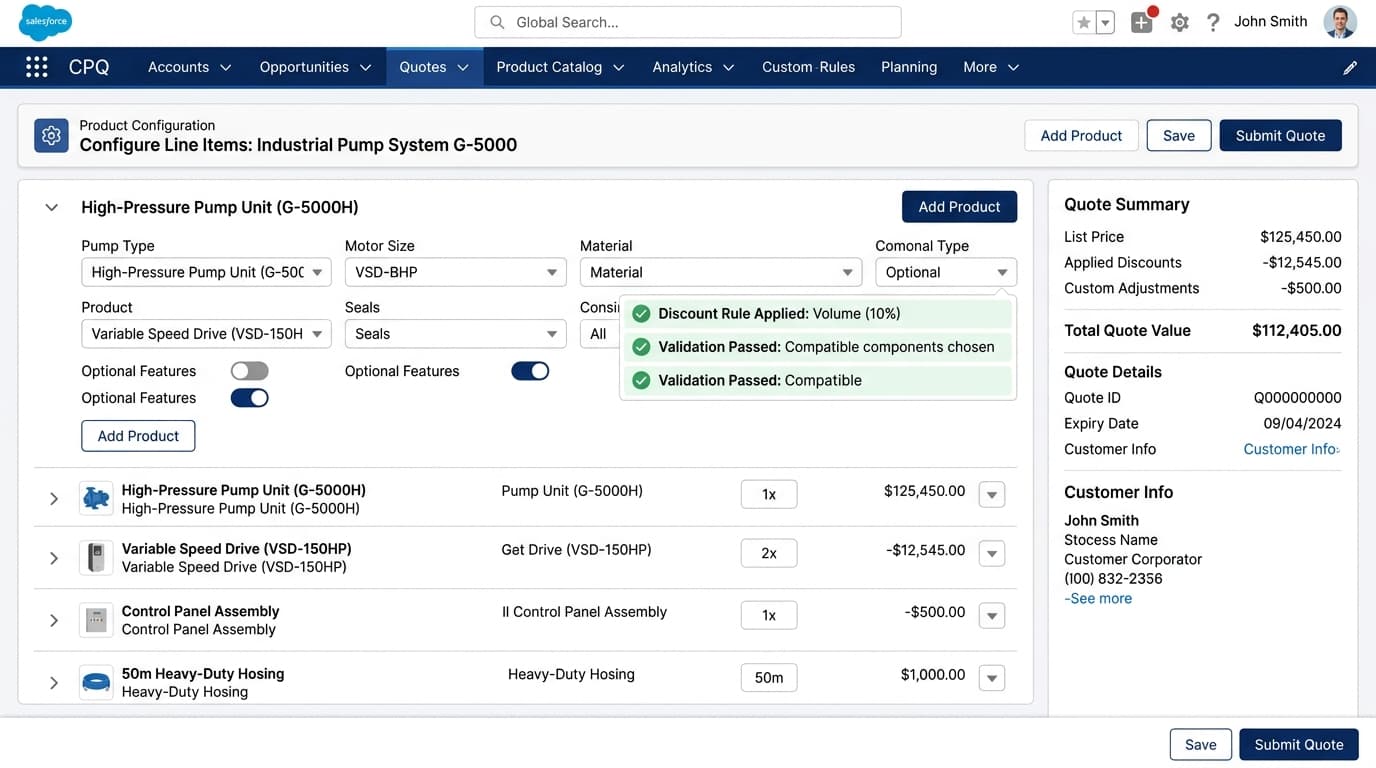
Salesforce CPQ: real-time product configuration, pricing rules, and quote generation in a unified sales workflow.
Connected data, scattered screens.
The client’s Salesforce CPQ and MuleSoft platform already connected quoting to live ERP data. But a rep’s day was still spread across separate screens, each built for one task.
- Salesforce record pagesaccounts, projects, quotes
- Quote editor actionslive stock, restock dates
- Reports and dashboardspipeline, quote status
- Emailsending quotes
Pricing added a further constraint. The client prices every quote through custom logic inside Salesforce CPQ: customer contract levels, project-specific pricing, and multipliers expressed as a percent of list.
Any new screen had to use that engine exactly, or quotes would go out at the wrong price.
Who Needed This Solved
Three roles. One unified platform.
Sales, operations, and customers were each blocked by the same disconnected workflow, from different sides of it.
Sales Representative
Guided selling flows to prevent incorrect product combinations and ensure accurate, repeatable quoting every time.
Project / Operations Manager
Real-time visibility into inventory levels and fulfillment options to optimize order processing and reduce delays.
Customer / Client
Seamless integration between Salesforce and ERP systems to ensure consistent data and a smooth order experience.
Our Approach
Standardized. Integrated. Automated.
A four-pillar engagement that turned a fragmented sales and ERP landscape into a single connected sales-to-fulfillment ecosystem.
01
Standardized Pricing & Quoting
Applied structured pricing and quoting frameworks across all products and account hierarchies, eliminating configuration errors.
02
API-Led ERP Integration
Designed a scalable MuleSoft integration architecture connecting Salesforce to SAP and Oracle in real time: no more batch delays.
03
Real-Time Data Access
Surfaced live inventory and order data directly within the sales workflow, enabling confident decisions during quoting.
04
Self-Service Experience Layer
Delivered Experience Cloud portals for customers to track orders, access data, and interact with the business independently.
Keep Salesforce as the engine. Replace only the screen.
In a headless setup, Salesforce still holds the data, security, automation and business logic, and a custom front end reads and writes through its APIs. Two design rules shaped the build.
Design rule 01
Price only through CPQ
Every quote is priced by calling the Salesforce CPQ Quote API, which runs the client’s own pricing plugin. The app never calculates or edits a net price itself.
Design rule 02
Reuse what already exists
Executive and sales metrics come from the client’s existing Salesforce reports through the Reports and Dashboards REST API. Live stock comes from the existing MuleSoft integration to the ERP.
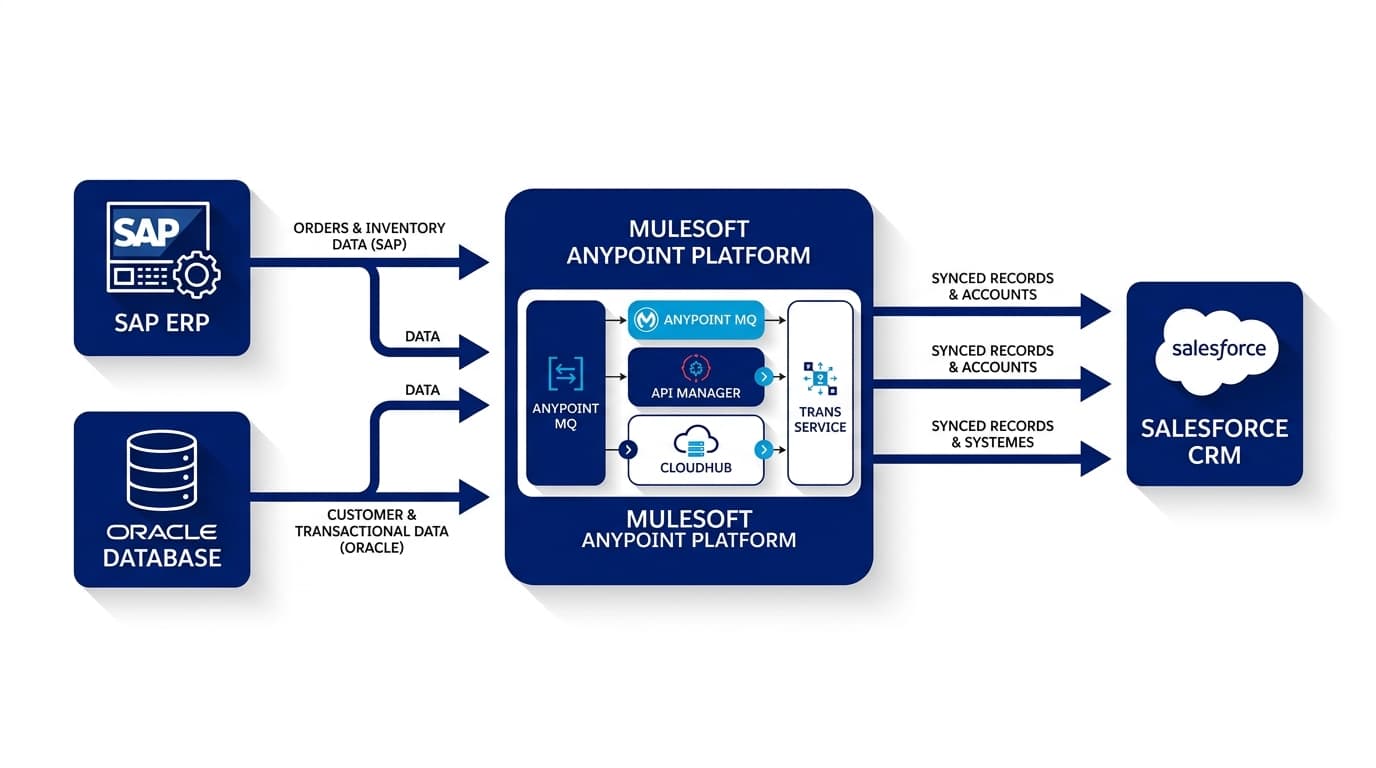
MuleSoft Anypoint Platform: API-led integration connecting Salesforce to SAP and Oracle ERP in real time.
Want to see how we’d approach your integration?
Whether you’re evaluating CPQ, planning an ERP integration, or building a self-service portal, we’ll map out a practical path forward in 30 minutes.
What Was Delivered
Five capabilities across the full sales and fulfillment lifecycle.
Each capability stands on its own; together they form a single, modular Salesforce-native platform.
Foundation
Sales Cloud Core Platform
Unified CRM with standardized data models, governed access, and automated workflows, reducing data inconsistencies and manual reconciliation.
Quoting
Salesforce CPQ Transformation
Guided selling and structured pricing logic eliminated configuration errors and enabled accurate, repeatable quote generation, reducing rework significantly.
Integration
MuleSoft Integration Layer
API-led integration with SAP and Oracle enabling real-time inventory checks, order creation, and status sync, eliminating batch delays entirely.
Mobile
Mobile CPQ: Inventory Actions
Inventory data surfaced directly within the product page and accessible via mobile, enabling real-time visibility during quoting in the field.
Self-Service
Experience Cloud Portals
Secure self-service for customers to track orders, upload assets, and access data, with custom registration, duplicate prevention, and controlled provisioning.
Technology Stack
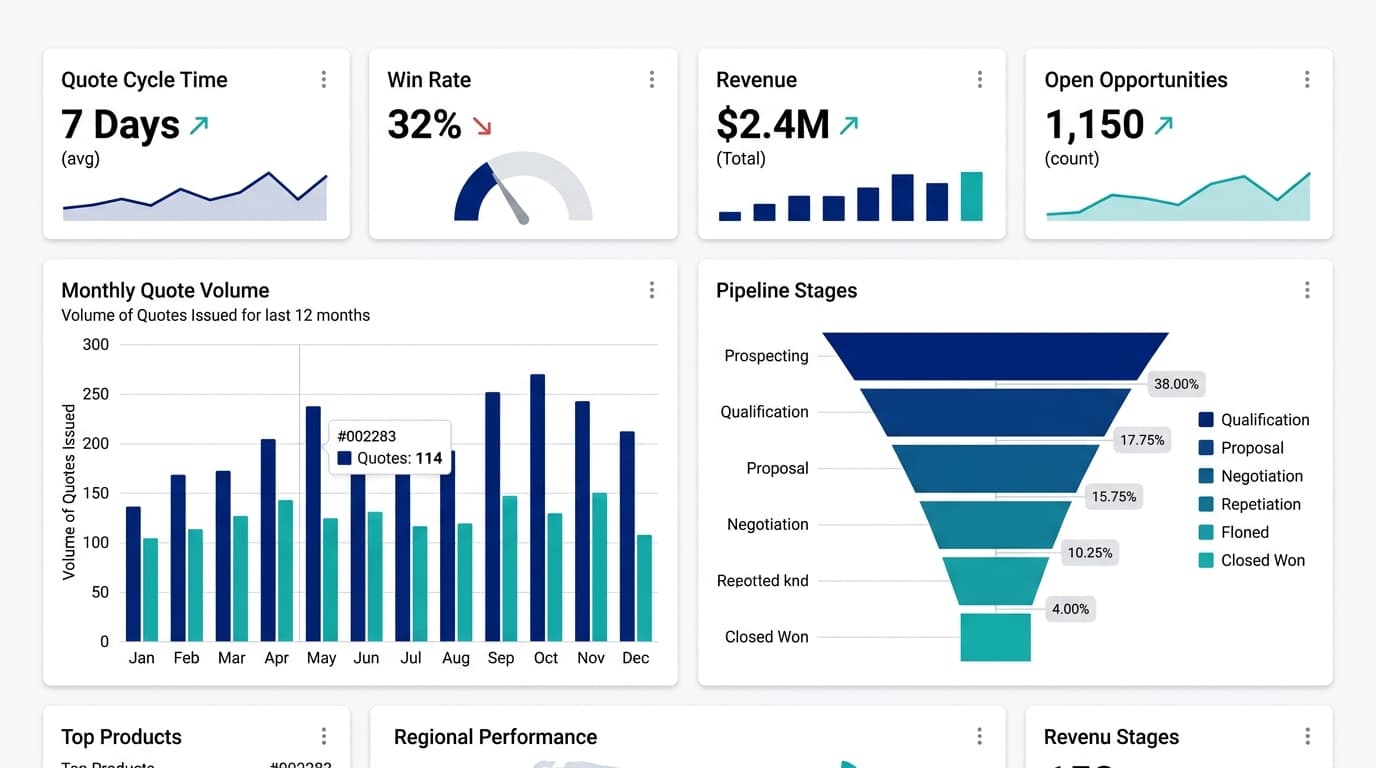
Sales operations dashboard: pipeline velocity, quote cycle time, and revenue metrics in a single view.
A headless Sales Command Center on Salesforce CPQ
One workspace, organised around the tasks reps repeat most.
The client’s sales reps had connected data but worked across separate screens to answer one customer. Decision Foundry built a single Sales Command Center on top of their existing Salesforce CPQ org.
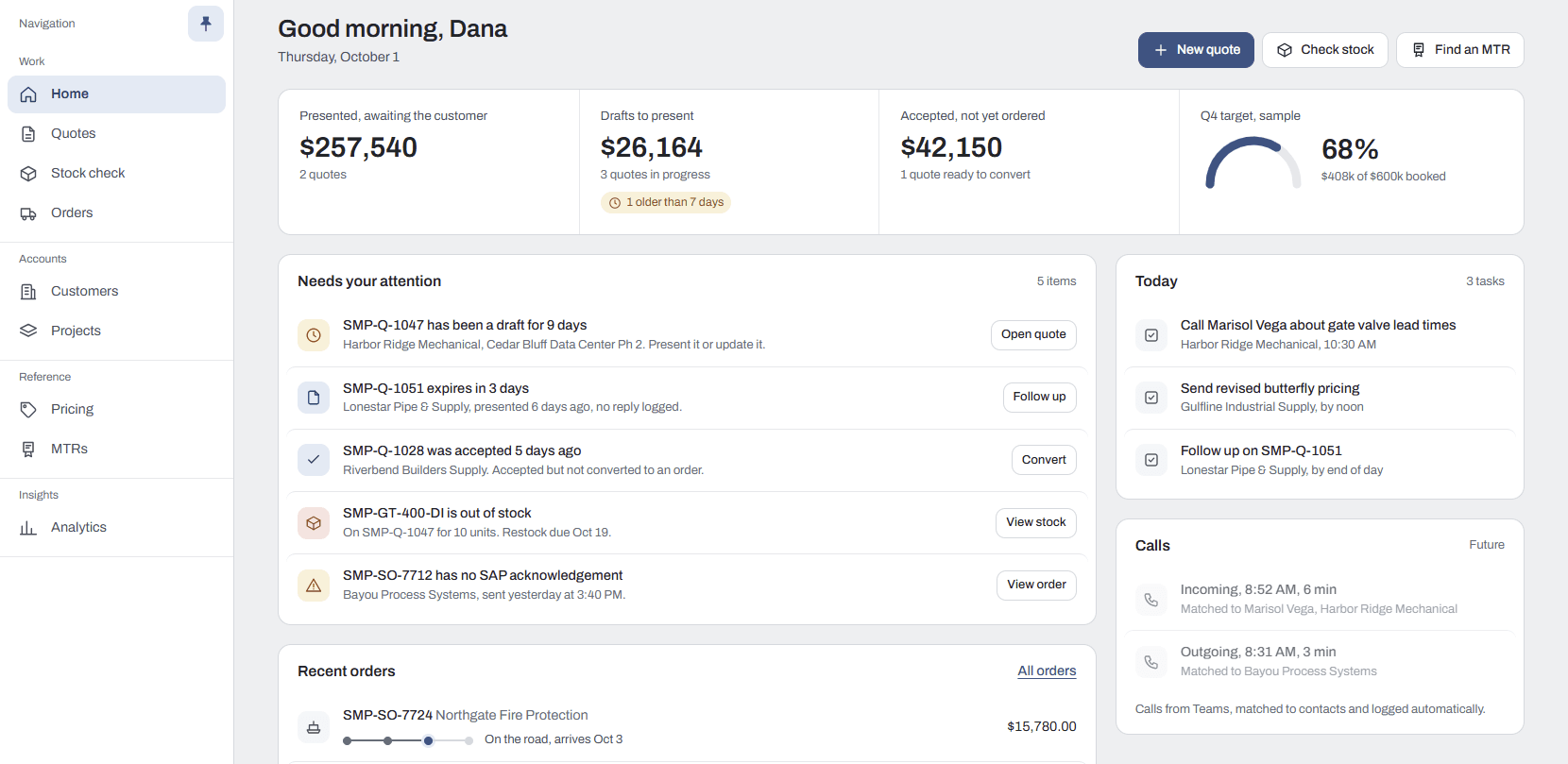
Home gives the rep the day at a glance: quotes awaiting customers, drafts to present, accepted quotes not yet ordered, items needing attention and recent orders. Three working areas sit behind it.
Quotes
Every quote in one list
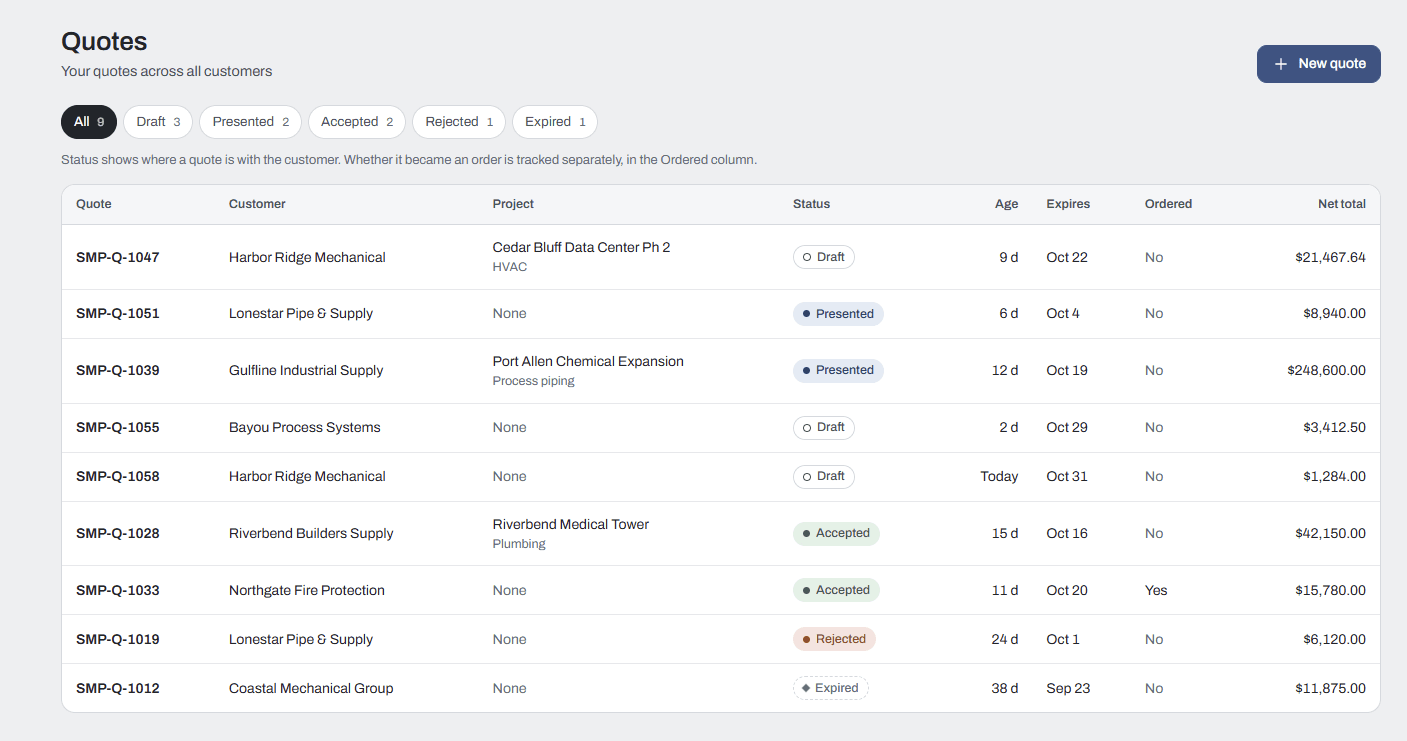
Every quote across every customer, filtered by status with live counts: Draft, Presented, Accepted, Rejected and Expired. Project and scope sit alongside the customer, so project quotes are easy to spot, and the age and expiry date on every quote surface stale drafts and quotes about to lapse. Whether a quote became an order is tracked in its own column, separate from status, so accepted quotes that never became orders stand out. Net totals are shown as priced by CPQ.
Stock check
Live availability
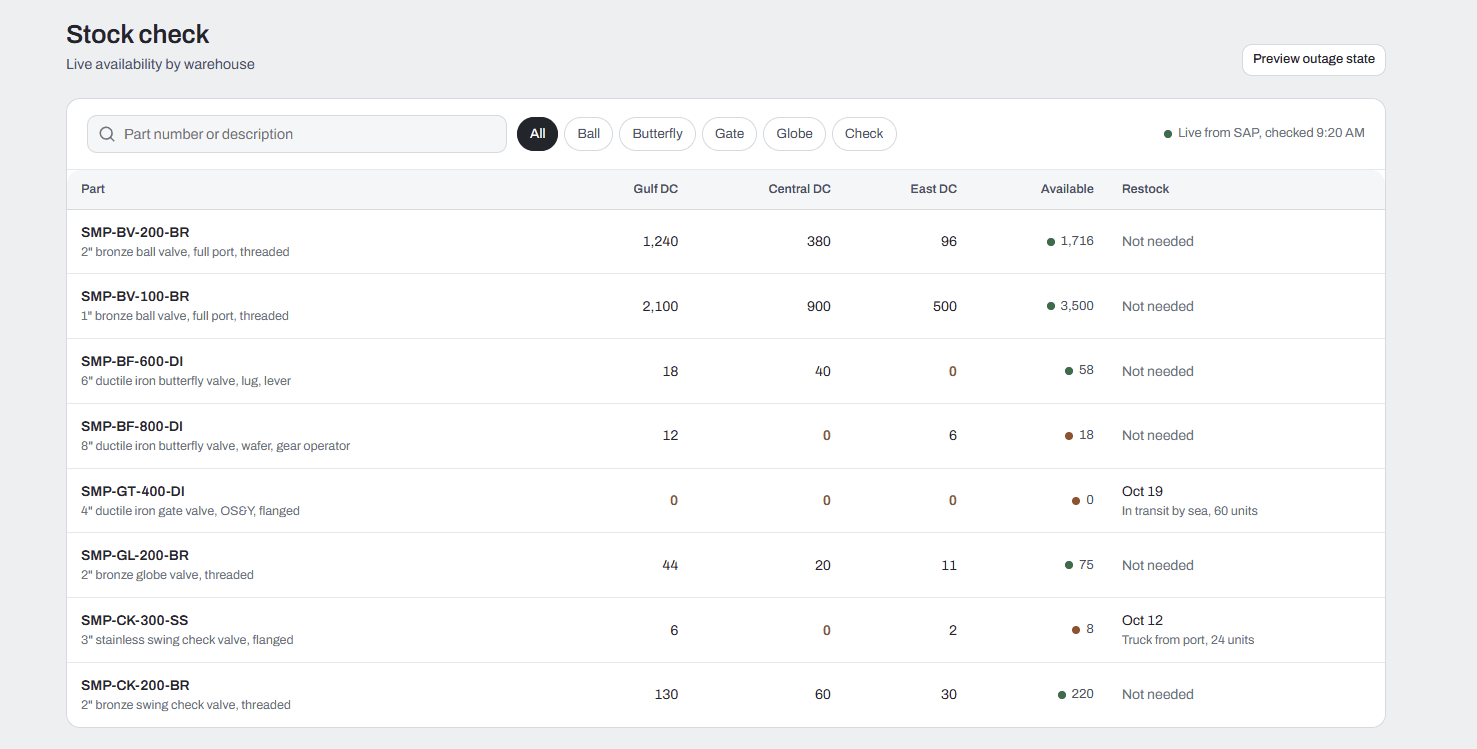
Live availability for every part across all warehouses, without opening a quote first. Reps can search by part number or description and filter by product type, with available quantity shown per warehouse and zero stock highlighted. Restock dates show how incoming stock is arriving, such as in transit by sea or by truck from port, and a clear fallback keeps reps working when the ERP connection is down.
Orders
Every order’s progress
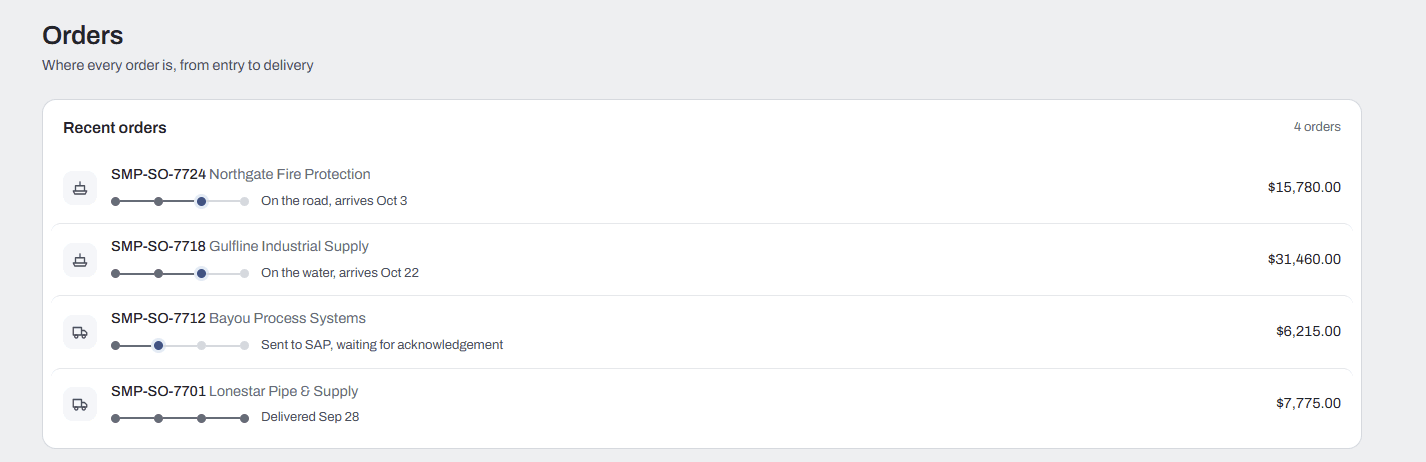
Where every order is, from entry to delivery, in one list. A progress line follows each order from entry to the ERP, shipment and delivery, with the shipping mode and arrival date for orders in transit. Orders still waiting for ERP acknowledgement are called out, and each order’s value is visible at a glance.
The Impact
Faster sales. Fewer errors. Better customer experience.
Quoting Accuracy
Reduced manual errors through guided selling and standardized pricing logic.
Faster Sales Cycles
Quicker quote generation and reduced dependency on manual validation.
Real-Time Inventory
Improved planning and fulfillment decisions from live ERP data.
Seamless Integration
Eliminated data silos and reconciliation effort between Salesforce and ERP.
Better UX
Mobile CPQ and self-service portals improved accessibility for teams and customers.
What the Sales Command Center Demonstrated
A new front end on an existing CPQ investment, without rebuilding it.
One workspace instead of many screens
Quotes, stock and orders in a single workspace.
Pricing stays trustworthy
Quotes are priced by the client’s own CPQ logic, so the new experience cannot drift from approved pricing.
Existing investments reused
Salesforce reports, the CPQ pricing plugin and the MuleSoft integration all carry over unchanged.
Looking Ahead
A front end that can keep growing.
Because Salesforce stays the engine, new capabilities can be added to the Sales Command Center without reworking the CPQ and MuleSoft platform underneath. Each one is another step toward making the rep’s day easier.
Views for every role
The same workspace can be shaped for operations and leadership, not only sales.
Customers and projects
One view per distributor and per project, with open quotes, orders and pricing together.
AI assistance
Reps could ask about quotes, stock and orders in plain language instead of searching for them.
Get In Touch