When we think of data visualization, it is the charts and graphs that come to mind. But did you know tables are a form of data visualization as well?
Tables play an essential role in presenting data. Unlike charts and graphs, tables can accommodate a great deal of detailed information, including numeric values, labels, descriptions, and additional contextual data. Plus, they offer flexibility of customization and adaptation to different structures & data formats, such as text, numbers, dates, and categorical variables. And the best advantage of it all, they are understood by a wider range of audiences.
While encoding charts may require some skill, most people are accustomed to reading and interpreting tabular information, which can enhance comprehension and ease of understanding.
Let’s understand further why tables can sometimes be advantageous over charts.
Precise numerical values Tables provide an exact representation of numerical values that can be helpful when specific figures are important for analysis and decision making. This is particularly relevant when dealing with financial data, scientific measurements, or precise calculations.
Detailed comparisons Tables make it easier for readers to perform detailed comparisons between different data points or categories, enabling them to examine and compare values more effectively. This is specially useful when dealing with multiple variables or when the data requires deeper scrutiny.
Textual information Tables are a great way to display both qualitative (text) and quantitative(numerical) data, which can help readers gain deeper knowledge about the topic. They can include additional details such as descriptions, explanations, or extra information about data that may be difficult to convey using charts alone.
Data lookup and reference When users need to quickly locate specific information or reference specific data points, tables can be more efficient and effective than charts. The organized layout of tables makes it easier to scan and find information, specially when the data in the table is well-structured and logically arranged.
It’s important to note though, the decision to display information through tables or charts depends on the nature of the data, the intended audience, and the goal of the presentation.
In many instances, using a combination of both tables and charts can offer the best of both worlds, allowing for a comprehensive understanding of the data through multiple visual and tabular representations.
ANATOMY OF A TABLE
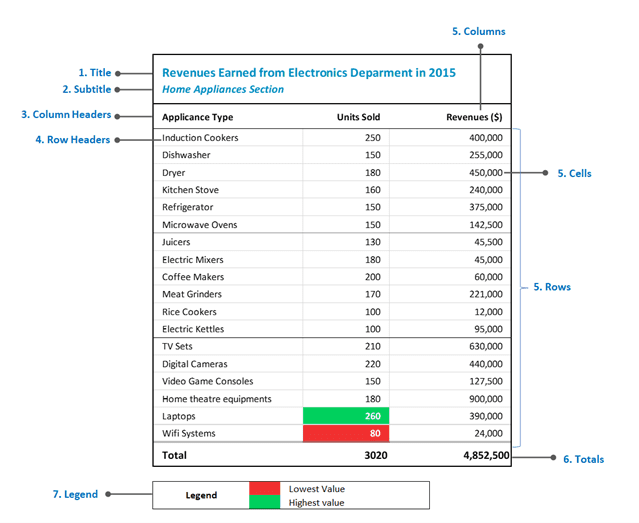
Title The table title provides a concise summary of the data presented in the table and helps users quickly understand the table’s purpose and context. To differentiate the title from the rest of the table, use a prominent background or font color, for font size, to make it easy on the users to understand the table’s information hierarchy.
Subtitle Subtitle includes additional descriptive text that provides more context or information about the data being presented. It typically appears below the table’s title and above the column headers or the table body. Subtitles could include clarification of the data, such as time period, methodology used, units of measurement, key finding. Subtitle formatting option would be similar to the table title.
Column Headers Column headers located at the top of each column identify the type or category of data contained in that column. You may format them differently, such as use different font, bold typeface or a different background color, to distinguish them from data cells.
Row Headers Row headers are situated at the leftmost side of the table. They label each row and help identify specific data points or categories associated with the rows.
Rows / Columns / Cells Rows represent horizontal records, columns represent vertical attributes, and cells are the individual units within the table that contain data values at the intersection of rows and columns.
Totals ( Rows or Columns ) In some instances, data tables may include a row or column at the bottom or rightmost side to display the totals or summary statistics for each respective column or row. This helps users quickly assess overall trends or aggregated values.
Key/Legend If the table incorporates specific symbols, abbreviations, or color coding, a key or legend may be included to provide explanations for these visual cues. This ensures that users can accurately interpret the data and understand any special representations used in the table.
Guidelines to Format Tables
A well formatted table really enhances the readability, clarity, and understanding of the data. Mostly, they are easier to interpret.
Looks understand the basic guidelines of table formatting by fixing the table below.

Let’s start fixing:
Use Clear and Consistent Titles, Subtitles and Column Headers Clearly label each column header to indicate the content or variable being represented and ensure that table titles are descriptive enough to give users a basic idea of the table’s purpose.
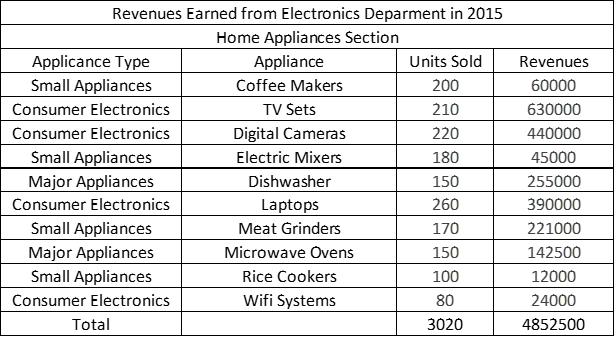
Apply Gridlines Sparingly Use gridlines sparingly to avoid cluttering the table. Consider using subtle gridlines or removing them entirely if they don’t add significant value to the table’s readability.
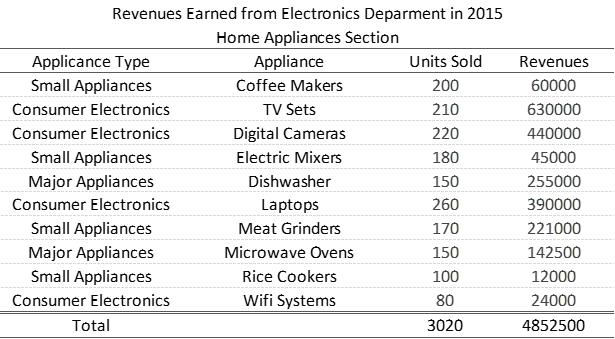
Format Titles As described earlier, you can use a bold typeface or different font or background coloring to format titles properly and differentiate them from the rest of the table.
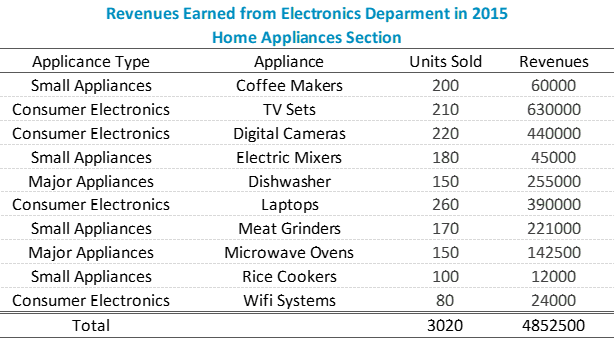
Align Data Appropriately Align the data within each column consistently. Generally, numeric data is right-aligned, while text or descriptive data is left-aligned. This alignment makes it easier for viewers to scan and compare values within a column. You can left-align titles & subtitles as well if you wish (like below) , but it is more of a personal preference.
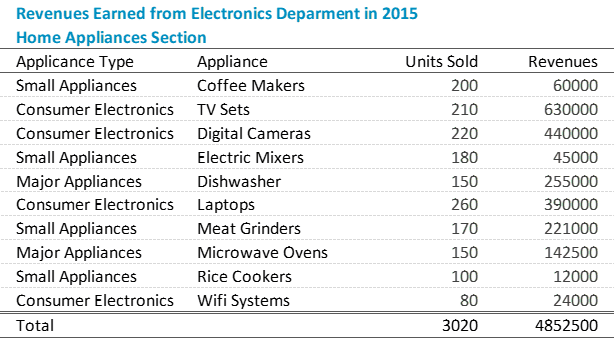
Format Numbers for Readability When dealing with numbers in particular, the larger they become, the harder it becomes to read, increasing the chances of confusion. As best practice, use a thousand separator to differentiate thousands from hundreds, or millions from thousands, and improve the readability of the table.
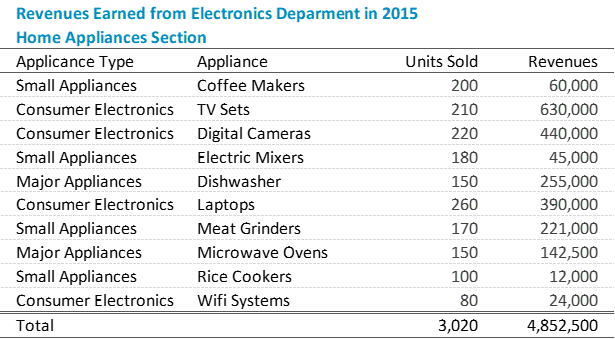
Provide Units of Measurement: Units of measurement helps viewers understand the scale and context of the data. You may include units in the column headers or as a separate row to provide clarity and avoid confusion. In the table below, the $ (dollar) sign has been included in the Revenue column header.
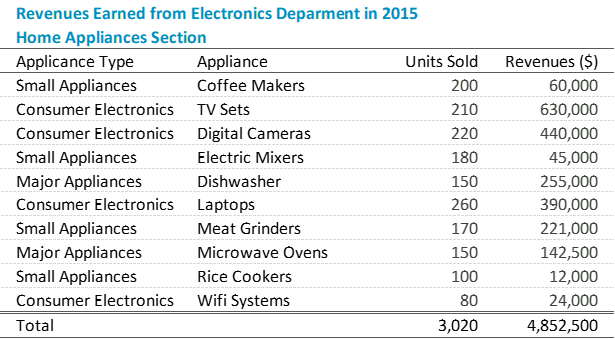
Adjust Row Height & Column Widths
Excessively wide or narrow cells that can make the table appear unbalanced or lead to data truncation. Use row height & column width adjustments to accommodate the content appropriately and ensure optimal readability. Also, use sufficient white space between rows and columns to create visual separation and make data more scannable.
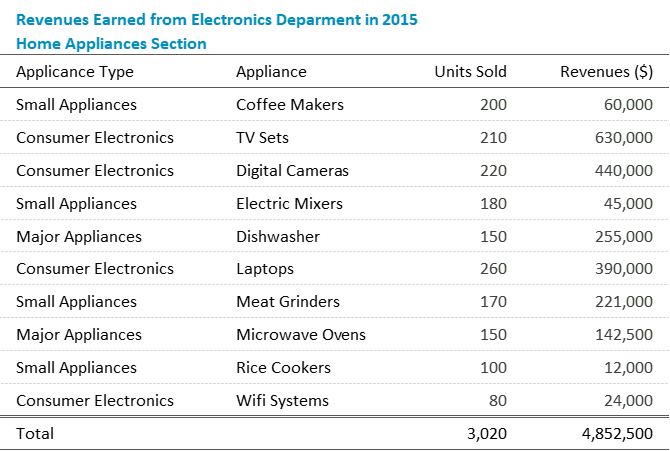
Group Related Data If your table has multiple sections or categories, consider grouping related data together visually. You can achieve this by using horizontal lines to separate sections or by using different font styles or background colors for distinct groups of rows.
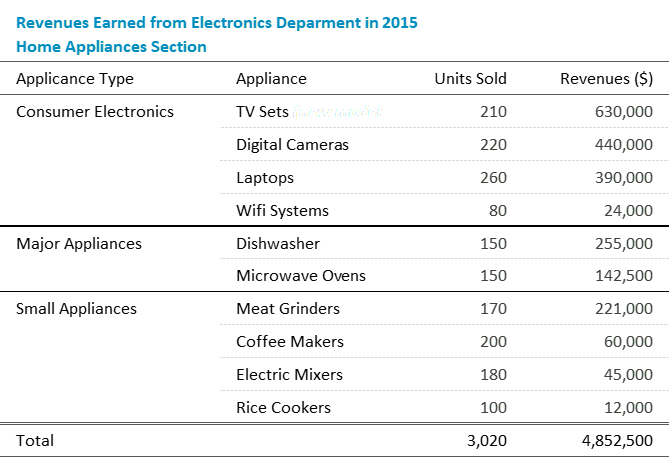
Consider Sorting and Highlighting Sort the data in a logical order to facilitate understanding. Use formatting techniques such as bolding, italics, or color to emphasize specific data points or highlight important information However, use these formatting elements sparingly and consistently to avoid distracting from the overall table.
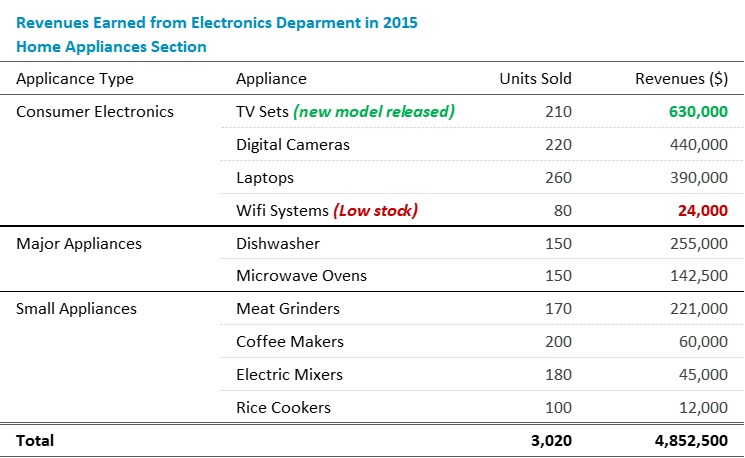
Other formatting considerations
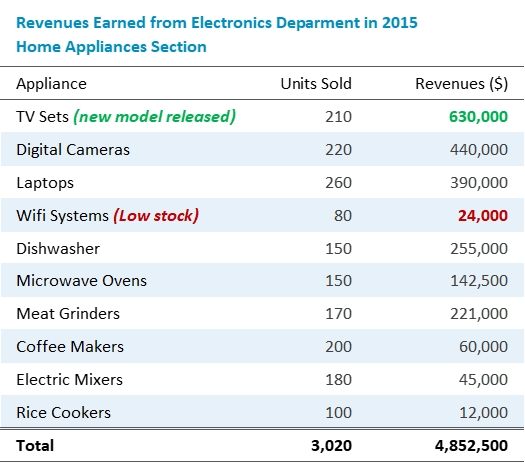
Alternate Row Shading Consider applying alternating row shading to improve readability and distinguish between rows. This can be achieved by using different background colors for even and odd rows or by using subtle shading patterns.
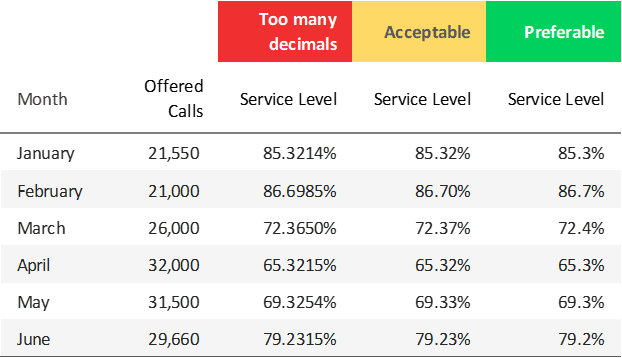
Limit Decimal Places Depending on the precision and significance of the data, consider limiting the number of decimal places displayed. This avoids unnecessary clutter and ensures readability. Precision will depend on context & sensitivity of numbers as well.
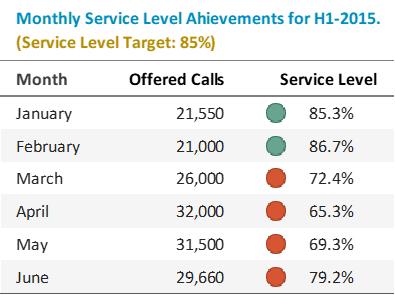
Consider Additional Visual Enhancements Depending on the nature of the data and the purpose of the table, you may consider including additional visual enhancements such as icons, arrows, or trend indicators to provide quick visual cues or aid interpretation.
Let’s remember…
Tables are a great visualization tool because they provide a structured format for displaying information in rows and columns, making it easy for users to compare and analyze the data. However, it is also worth noting that the choice of visualization you use will ultimately depend on the nature of the data and the insights you want to convey.
While tables are effective for certain types of data, other visualizations tools like charts or graphs will be more suitable for presenting trends, distributions, or relationships.
But as far as tables are concerned, just make sure your formatting choices align with the purpose and audience. Keep the table design clean and uncluttered. Remove unnecessary gridlines, excessive text, or elements that do not add value. Overall, simplify the table layout to focus on the essential information ensuring that the data is presented in a clear, organized, and visually appealing manner.
Decision Foundry has over 20 years of experience helping enterprise customers design business intelligence dashboards that turn raw data into clear, actionable visuals.