


What licensing options are available for Tableau Cloud?
Tableau Cloud offers role-based licenses, including Creator, Explorer, and Viewer. The right combination depends on who needs to build, explore, or view analytics within your organization.
Your business needs more than dashboards. It needs an analytics environment that makes data accessible, reporting easier to manage, and insights available when decisions matter. Tableau Cloud provides a fully hosted analytics platform that removes the need to maintain your own Tableau Server infrastructure.
Decision Foundry provides Tableau Cloud Implementation Services to help you migrate existing environments, connect your data ecosystem, and build a scalable analytics foundation.
Maintaining Tableau Server requires dedicated resources for infrastructure, upgrades, and administration.
Business information spread across multiple platforms makes consolidated reporting difficult.
Distributed teams need easier access to dashboards and consistent business insights.
Repetitive data preparation and refresh processes slow down reporting.
Moving existing dashboards, data sources, and workflows requires careful planning.
Inconsistent permissions and content management make analytics harder to control.
Our Tableau Cloud Consulting approach starts with assessing your existing Tableau environment, infrastructure, data sources, and reporting requirements to define the right cloud adoption strategy and implementation roadmap.
We configure your Tableau Cloud environment, including sites, users, permissions, authentication, and publishing workflows to deliver a reliable analytics foundation aligned with your business requirements.
We provide Tableau Cloud Migration services by assessing existing workbooks, dashboards, data sources, and dependencies before planning and executing the migration. We also validate migrated content to maintain reporting continuity.
We connect Tableau Cloud with platforms such as Snowflake, Databricks, Salesforce, and enterprise databases. We also configure Tableau Bridge where required for private-network data connectivity.
We develop interactive dashboards that bring business metrics together. We also optimize existing workbooks to improve usability, simplify visualizations, and support changing reporting requirements.
We configure user roles, permissions, site structures, and content management practices to maintain controlled access and consistent analytics governance.
We provide team training and continued technical support, along with dashboard optimization, performance improvements, and platform administration.
Both platforms offer powerful analytics capabilities, but differ in hosting, maintenance, and infrastructure control.
| Comparison | Tableau Cloud | Tableau Server |
|---|---|---|
| Hosting | Fully hosted by Tableau | On-premises or customer-managed cloud |
| Maintenance | Updates managed by Tableau | Updates managed by your team |
| Infrastructure | No server infrastructure to maintain | Requires infrastructure management |
| Data Connectivity | Supports Tableau Bridge for private-network data | Connects based on deployment |
| Scalability | Managed cloud environment | Depends on available infrastructure |
Tableau Cloud suits businesses looking for simplified management and cloud accessibility, while Tableau Server offers greater infrastructure control.
We help you evaluate your existing analytics environment, infrastructure, and data connectivity requirements to identify the right deployment approach.
From platform selection and migration planning to implementation and ongoing optimization, we support you at every stage.
Our Tableau Cloud Implementation Services follow a structured approach, from assessing your existing analytics environment to deployment, validation, and ongoing optimization.
We review your existing Tableau environment, infrastructure, data sources, and business requirements to define the implementation or migration strategy.
We plan your Tableau Cloud architecture, including site structure, user access, authentication, permissions, and data connectivity.
We configure Tableau Cloud, establish data connections, and set up Tableau Bridge where required.
We migrate selected workbooks, dashboards, and published data sources while developing or improving reports where needed.
We validate data accuracy, dashboard functionality, refresh schedules, and user permissions before deployment.
We support deployment, train your teams, and identify opportunities to improve dashboard performance and analytics adoption.
Tableau Cloud acts as the analytics and visualization layer within your wider data ecosystem. It connects business data from different platforms and makes it accessible through centralized dashboards and reports.
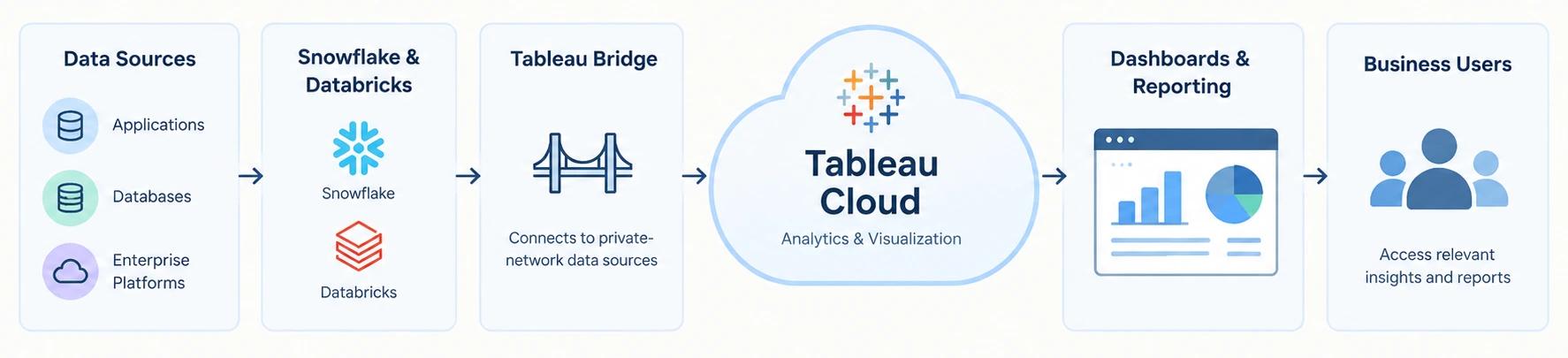
Connect business applications, databases, and enterprise data platforms to bring relevant information into your analytics environment.
Use data stored and processed in these platforms to build reports, explore trends, and analyze business performance.
Connect Tableau Cloud to supported private-network data sources, enabling live queries and scheduled extract refreshes where applicable.
Bring connected data into interactive dashboards that help teams monitor KPIs, identify trends, and understand business performance.
Give authorized users access to relevant dashboards and insights, supporting reporting across departments and teams.
Together, these components create a connected analytics environment where data can move from different business systems into meaningful insights.
Our team brings experience in Tableau Cloud consulting, implementation, dashboard development, migration, data integration, and analytics optimization.
Our experience across data, analytics, and enterprise technology helps us approach analytics transformation from both technical and business perspectives.
We work across Tableau, Snowflake, Databricks, Salesforce, and other platforms to build solutions that fit your existing technology ecosystem.
We align each implementation with your infrastructure, reporting requirements, user needs, and long-term business goals.
We consider authentication, permissions, data access, and governance requirements when designing your Tableau Cloud environment.
From strategy and implementation to migration, integration, training, optimization, and ongoing support, we stay involved beyond deployment.
Move your analytics to the cloud with expert Tableau Cloud Implementation Services. Decision Foundry helps you simplify analytics management, connect business data, and build a scalable reporting environment.
Talk to Decision FoundryKeep Exploring
Tableau Cloud offers role-based licenses, including Creator, Explorer, and Viewer. The right combination depends on who needs to build, explore, or view analytics within your organization.
Yes. You can migrate selected projects, workbooks, and data sources based on business priorities. A phased approach helps minimize disruption while transitioning to Tableau Cloud.
Tableau Cloud can connect to multiple supported data sources, allowing you to bring information from different platforms into a unified reporting environment. Connectivity depends on the available connectors and data architecture.
Tableau Cloud provides security capabilities such as encryption, authentication, and permission management. Organizations can configure access controls to determine who can view and interact with dashboards and data.
Yes. You can create custom dashboards, organize content into projects and sites, configure permissions, and establish reporting workflows based on your team's requirements.
You should evaluate your existing data sources, Tableau content, user requirements, authentication setup, connectivity needs, and reporting priorities. This helps define the implementation scope and avoid migration challenges.