


Is Tableau Pulse available on Tableau Server?
Tableau Pulse is available through Tableau Cloud. Organizations using Tableau Server need to evaluate their deployment requirements before adopting Tableau Pulse.
Business data is constantly changing, but keeping track of every important metric takes time. Teams often rely on dashboards and manual reports to spot changes.
Tableau Pulse delivers personalized metric insights and guided exploration. Decision Foundry helps you implement Tableau Pulse around your business priorities, giving teams clearer visibility into performance and the factors driving daily change.
Teams switch between dashboards and reports to find relevant KPIs, making it harder to maintain a consistent view of performance.
Teams often depend on scheduled reports to spot business changes, delaying their ability to respond to emerging trends.
Dashboards show changing metrics, but understanding the reasons behind those changes often requires additional analysis.
Business users rely on analysts for routine data questions, slowing access to insights, and increasing reporting workloads.
Different departments may calculate the same KPIs differently, creating conflicting numbers and inconsistent views of business performance.
Employees may struggle to navigate BI tools, limiting their ability to explore metrics and use insights independently.
Our Tableau Pulse consulting approach starts with assessing your existing Tableau environment, analytics requirements, and business priorities. We identify relevant use cases and define an implementation strategy aligned with your organizational goals.
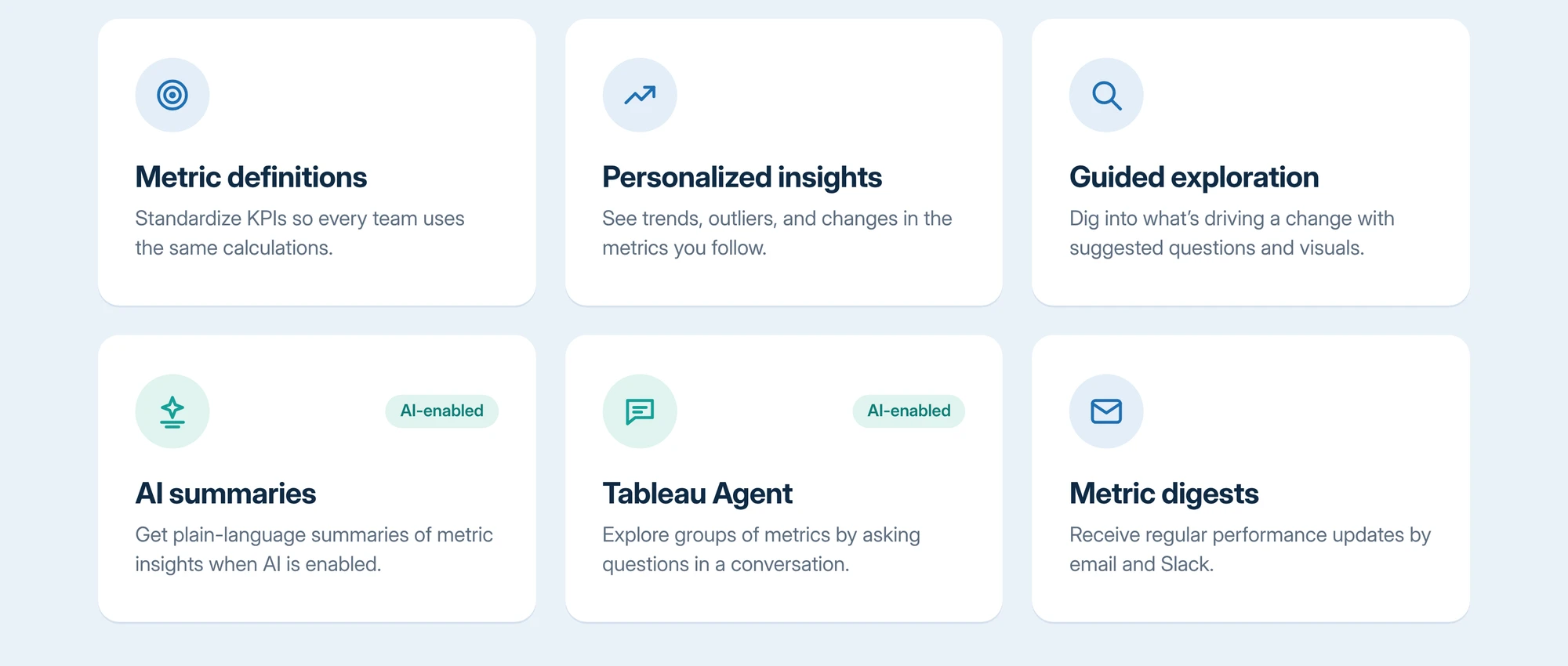
We establish standardized metric definitions, calculations, time dimensions, filters, and comparison periods. This creates a consistent foundation for monitoring KPIs and helps different teams work with metrics relevant to their responsibilities.
We connect Tableau Pulse to suitable published Tableau Cloud data sources. We assess data structure, completeness, and quality to ensure metrics are built on reliable information and support meaningful analysis.
We configure available insight capabilities to help users identify trends, outliers, and factors contributing to metric changes. We also support the enablement of AI-powered summaries and Tableau Agent in Pulse where licensing and site settings permit.
We organize metrics around business functions, user roles, and reporting requirements. Teams can follow relevant KPIs, apply available filters, and focus on the performance indicators that matter to their work.
We configure supported email and Slack digests to deliver relevant metric updates within existing workflows. This helps users stay informed without constantly checking dashboards.
We help configure data source permissions, metric definition access, and relevant site settings. We also account for existing data security requirements, including row-level security, to support controlled access to business information.
We support deployment, user enablement, and ongoing optimization. Our team helps refine metric definitions, improve adoption, and expand the use of Tableau Pulse as business requirements evolve.
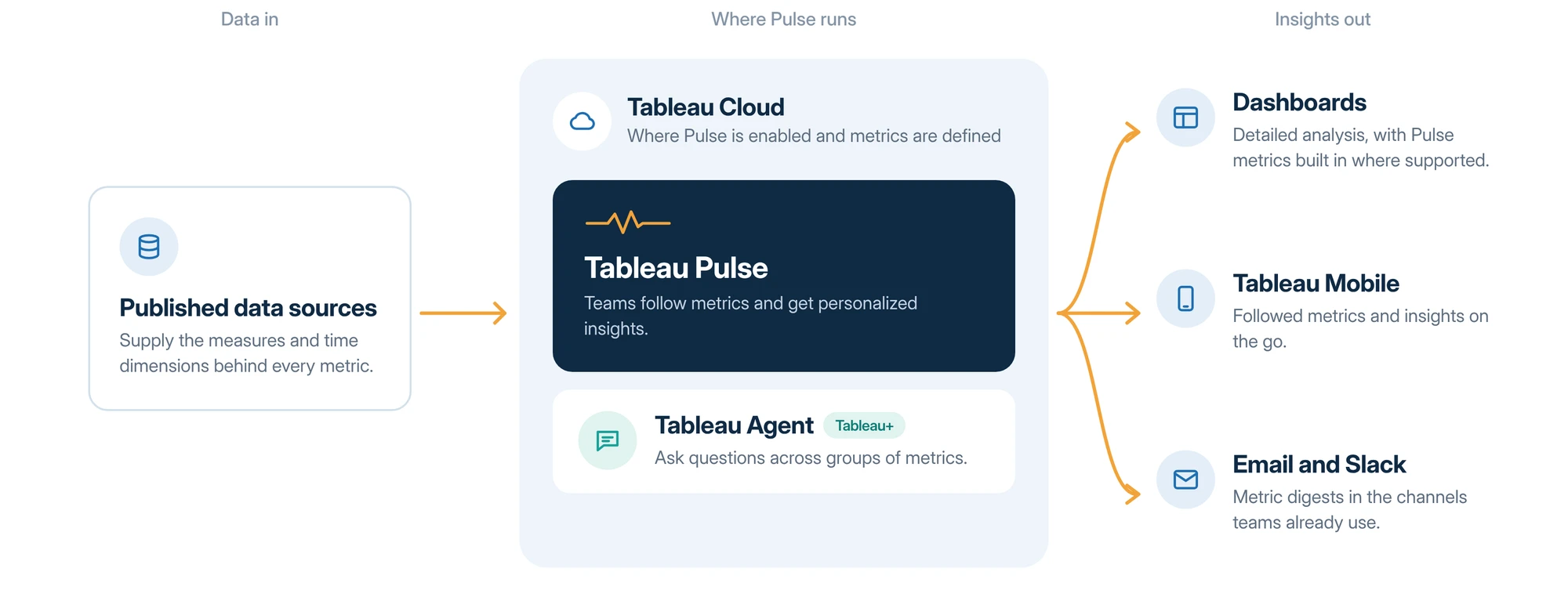
Tableau Pulse adds to your Tableau setup without replacing anything. Your existing data sources power its metrics, and the insights reach people through the dashboards, mobile apps, email, and Slack channels they already use. Tableau Agent, available with Tableau+, adds conversational exploration on top.
Review your existing Tableau environment, published data sources, reporting processes, business objectives, and implementation requirements.
Identify priority metrics, define KPIs, establish the required data structure, and plan the implementation and governance approach.
Enable Tableau Pulse, create metric definitions, configure filters and insights, and establish relevant user access and notification settings.
Test metric calculations, data accuracy, permissions, insight generation, and notification delivery to ensure the solution meets business requirements.
Roll out Tableau Pulse to relevant users, organize followed metrics, and support the adoption of personalized insights across teams.
Review usage, refine metric definitions, address changing reporting requirements, and expand the solution as business needs evolve.
Our team brings extensive experience in Tableau architecture, dashboard development, enterprise analytics, data integration, and platform optimization.
Our experience across the Tableau and Salesforce ecosystems helps us align Tableau Pulse with your existing analytics environment and broader business technology landscape.
We begin with your business priorities, reporting challenges, and KPIs to ensure the implementation supports meaningful business outcomes.
We help establish reliable data sources, standardized metrics, and consistent reporting practices to support a connected analytics experience.
We account for data quality, permissions, governance, and scalability when configuring Tableau Pulse for enterprise requirements.
From initial assessment and configuration to deployment, user enablement, and ongoing optimization, we help your teams get lasting value from Tableau Pulse.
We at Decision Foundry help you implement Tableau Pulse to bring personalized metric insights and proactive analytics closer to everyday decisions.
Talk to Decision FoundryKeep Exploring
Tableau Pulse is available through Tableau Cloud. Organizations using Tableau Server need to evaluate their deployment requirements before adopting Tableau Pulse.
Yes. Tableau Pulse complements existing dashboards and supported Pulse metrics can also be added to Tableau dashboards to bring key metrics and detailed visualizations together.
Tableau Pulse requires metric definitions based on suitable published data sources. Recommended metrics can be created from supported dashboard data, but existing reports do not automatically become Pulse metrics.
Tableau Pulse is available with supported Tableau Cloud offerings. Advanced capabilities such as Tableau Agent in Pulse, correlated metrics, and forecasting are part of Tableau+.
Yes. Metric definitions support configurable time dimensions, comparison periods, filters, and goals or thresholds. Tableau Pulse Consulting can help identify the right metrics and configurations for your business goals.
No. Tableau Pulse focuses on metric monitoring and guided insights, while traditional Tableau dashboards continue to support detailed visual analysis, interactive reporting, and complex data exploration.